
MP3 vs WAV vs AAC: Which Audio Format Should You Use?
Short answer: use MP3 unless you have a specific reason not to. WAV is for editing and archiving. AAC is for Apple users. FLAC is for people with expensive headphones and too much hard drive space. Here's the data behind each choice — no audiophile hand-waving.
Quick Comparison Table
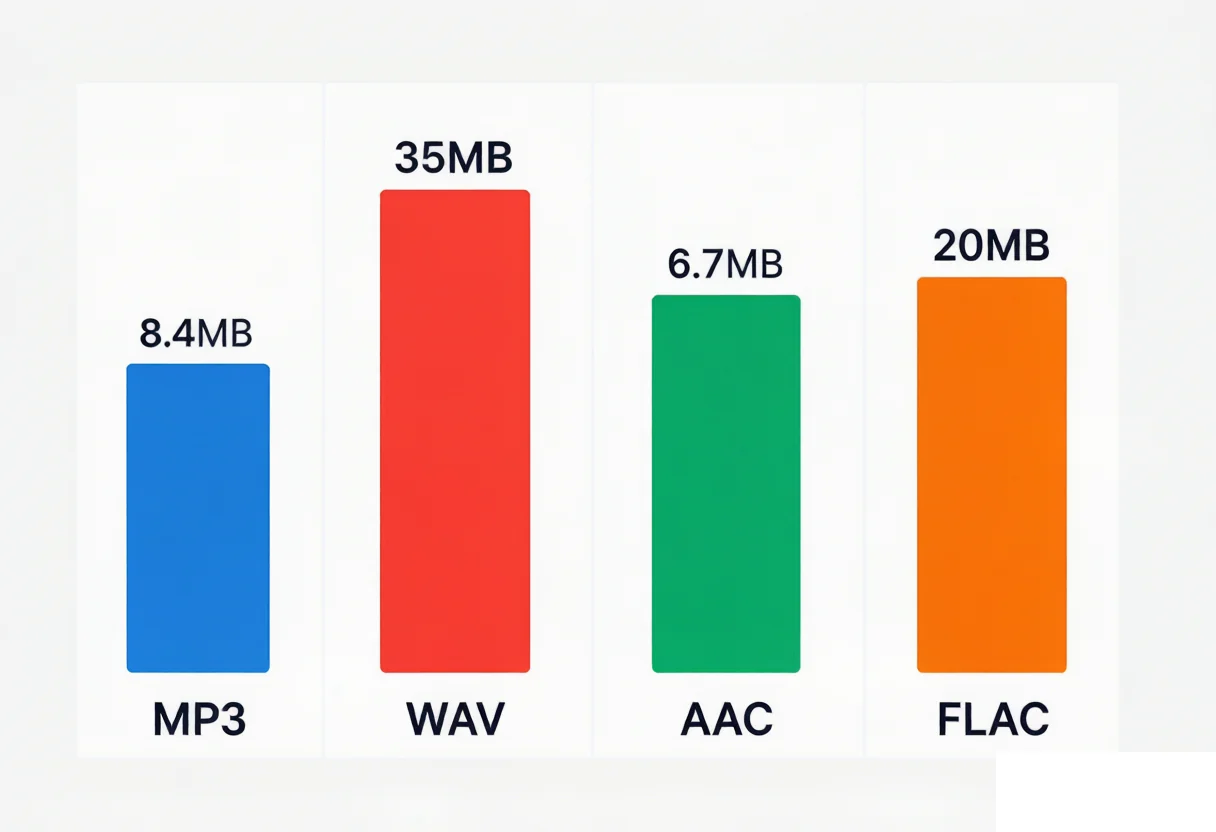
| Format | Type | Quality | Size (3.5-min song) | Plays on everything? |
|---|---|---|---|---|
| MP3 320 kbps | Lossy | Near-CD | ~8.4 MB | Yes — literally everything |
| MP3 128 kbps | Lossy | OK for voice, rough for music | ~3.4 MB | Yes |
| WAV | Uncompressed | Bit-perfect | ~35 MB | Editing: yes. Sharing: impractical |
| AAC 256 kbps | Lossy | Slightly better than 320 MP3 | ~6.7 MB | Apple + modern Android/Windows |
| FLAC | Lossless compressed | Bit-perfect | ~20 MB | Not on iPhone, not on most car stereos |
| M4A | Container (usually AAC inside) | Depends on codec | ~2–8 MB | Apple-native, OK elsewhere |
What Blind Tests Actually Say (You Probably Can't Hear the Difference)
Before anyone tells you "WAV is obviously better" — here's what controlled studies show.
In a 2009 AES paper by Pras et al., 13 trained listeners (9 recording engineers, 4 pro musicians) did double-blind A/B tests comparing uncompressed audio against MP3 at 96, 128, 192, 256, and 320 kbps across five genres. At 320 kbps, the panel showed no statistically significant preference for WAV over MP3. Even the most experienced engineers scored just above chance.
A 2013 University of Hamburg study with 21 musicology students using ABX testing had the same result: at 320 kbps, nobody reached the 95% significance threshold — detection scores clustered around random guessing.
Translation: if you're listening on anything short of studio monitors in a treated room, the format debate between 320 kbps MP3 and WAV is academic. The bottleneck is your headphones, your room noise, and the fact that you're probably over 25 (high-frequency hearing declines with age — that's not an insult, it's biology).
When CAN you hear the difference? At 128 kbps MP3. Cymbal crashes get a swishy, underwater sound. Stereo separation collapses. That's audible on decent headphones. At 96 kbps and below, even casual listeners notice — it sounds like someone threw a blanket over the speakers.
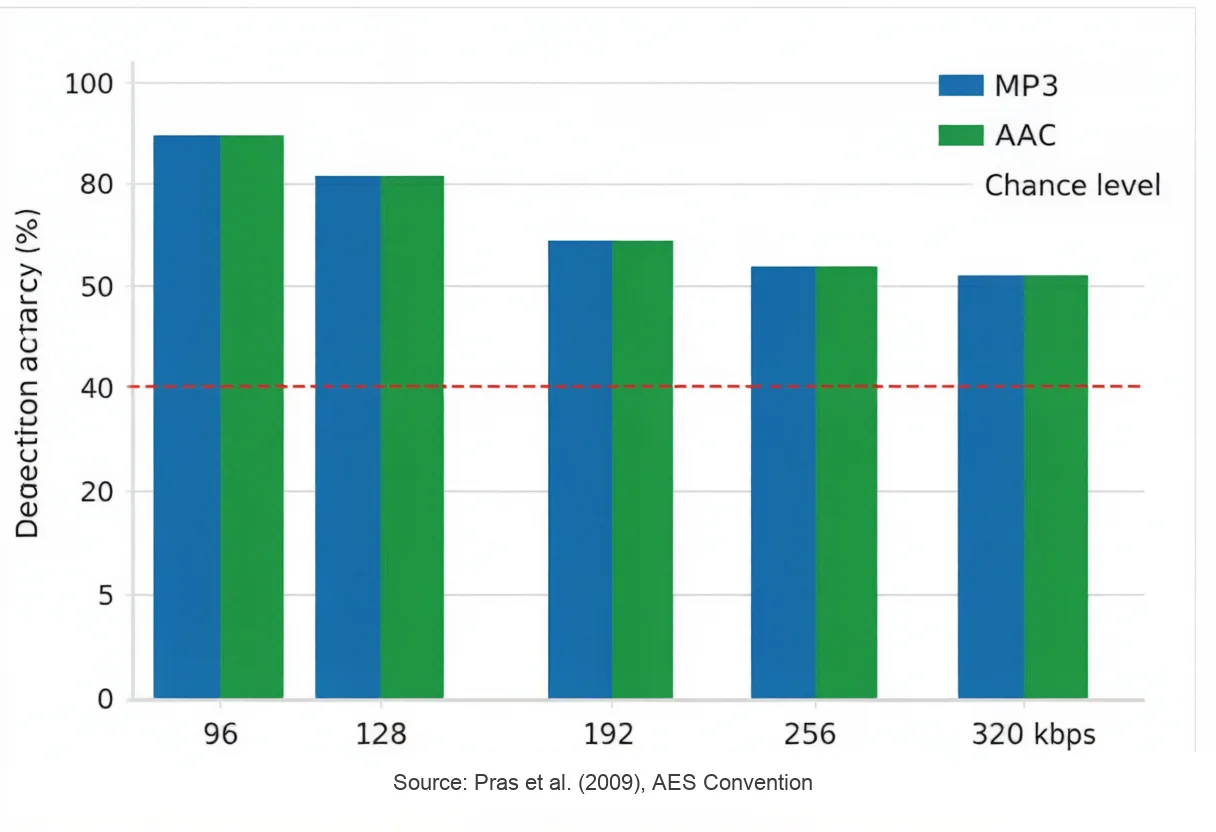
Detection accuracy in blind A/B tests between MP3/AAC and uncompressed audio. At 256–320 kbps, listeners score near random chance. Source: Pras et al. (2009) AES.
Now, with the blind test data on the table, let's talk about when each format actually matters.
MP3: The Default. Use It Until You Have a Reason Not To
MP3 at 320 kbps is what Spotify Premium streams (in OGG, but comparable quality). It's what 99% of digital music you've ever heard was distributed as. It plays on everything: your phone, your car, your 2005 iPod, your smart fridge if it has a speaker.
The real selling point isn't quality — it's that you never have to think about compatibility. Send an MP3 to anyone, to any device, and it just works. That matters more than a theoretical quality difference nobody can hear.
One thing MP3 sucks at: repeated editing. Every time you open an MP3, make changes, and export as MP3 again, the encoder throws away more data. After 2–3 cycles, the degradation gets audible. This is called generation loss — and it's the real reason pros use WAV for production work, not because MP3 "sounds bad."
Use MP3 when: sharing files, Android ringtones, podcast distribution, car USB drives, music libraries where you want more songs and don't want to buy more storage.
Need to trim an MP3 without losing quality? Our MP3 Cutter runs in your browser — files under 20 MB process locally, zero re-compression. 4.9/5 from thousands of users.
WAV: Only Worth It When You're Going to Touch the File Again
WAV stores raw, uncompressed audio samples. A 3.5-minute song is ~35 MB. A 1-hour podcast is ~600 MB. You don't want WAV on your phone.
But for three specific use cases, WAV is non-negotiable:
Multi-round editing. If you're EQing, compressing, noise-reducing, or time-stretching audio, every processing pass amplifies any lossy artifacts that are already baked in. Start with WAV, do all your edits, export to MP3 once at the end.
Archiving something irreplaceable. If you're digitizing old vinyl, saving a family recording, or keeping a master copy of your music, use WAV or FLAC. Storage is cheap. You can't un-compress a lossy file later.
Sending stems to someone else who will edit them. If a video editor, podcast producer, or collaborator is going to work with your audio, send WAV. Don't make them start from a degraded source.
For everyday listening? WAV is a waste of space. A 1000-song library is 35 GB as WAV versus 8.4 GB as 320 kbps MP3. You won't hear the difference on AirPods.
Working with big WAV files? Our WAV Cutter trims and splits WAVs with lossless output — no re-compression, no quality loss.
AAC: MP3's Smarter Younger Sibling
AAC is MP3's successor — better compression algorithms, more filter bands, smarter handling of high frequencies. At 128 kbps, AAC matches MP3 at ~192 kbps. At 256 kbps (the iTunes/Apple Music standard), AAC is transparent for essentially everyone.
Apple bet the farm on AAC. Every song you buy from iTunes, every Apple Music stream, every iPhone Voice Memo — AAC. If you live in Apple's ecosystem, this isn't even a choice: your devices already default to AAC.
One specific thing that matters: AAC handles very low bitrates better than MP3. AAC at 96 kbps is still listenable for music. MP3 at 96 kbps starts sounding rough. If you're compressing for a podcast feed or a voice memo archive, AAC gives you better quality at the same tiny file size.
Compatibility note: AAC works on Android (since 2011), Windows 10+, modern car stereos, and game consoles. But if you plug a USB drive into a 2013 Honda Civic? MP3 only. That's the one edge MP3 still holds — backward compatibility with ancient hardware.
How iPhone ringtones actually work (covered by almost nobody): iPhone ringtones use the M4R format. M4R is AAC audio in an MPEG-4 container — identical to an M4A file with the extension renamed from .m4a to .m4r. Every Voice Memo you record is already an AAC file. Trim it to ≤30 seconds, rename the extension, sync to iPhone. That's it. No special encoder, no iTunes gymnastics.
Making an iPhone ringtone? Our Ringtone Maker handles trim → M4A export → rename workflow in one place. No account, no sync hassles. We also have an AAC Cutter for general AAC trimming.
FLAC: For Exactly Two Kinds of People
FLAC is lossless — bit-for-bit identical to WAV — but compressed to about 55% of WAV's size. A 35 MB WAV song becomes ~20 MB as FLAC.
FLAC makes sense for: (1) archiving your CD collection, and (2) listening on high-end gear where you actually have the DAC, amp, and headphones to resolve the difference (and you're under 40 with intact high-frequency hearing). For these two groups, FLAC is perfect — smaller than WAV, same quality, supports album art and metadata.
For everyone else, FLAC is the format you download, realize your iPhone won't play it in the Music app, install VLC out of frustration, and eventually convert to MP3 anyway. Facts.
Hard compatibility reality: iPhones don't natively decode FLAC in the Music app (you need VLC or Flacbox). Most car stereos skip it. Windows Media Player needs a codec pack. Tesla added FLAC support in 2019. PlayStation since PS4. Xbox since Xbox One. It's supported where it matters for audiophiles, absent where it matters for normal people.
M4A: The Format Everyone Misunderstands
M4A is not a codec. It's a container — a box. Usually, the box contains AAC audio. Sometimes it contains ALAC (Apple Lossless — Apple's FLAC equivalent). The extension tells you nothing about quality.
When your iPhone records a Voice Memo, it's M4A with AAC inside. When you buy from iTunes, same thing. But M4A can hold lossless ALAC — so two M4A files can be wildly different in quality with the same file extension. This trips people up constantly.
The practical point: M4A and AAC are interchangeable in most tools. If something reads AAC, it reads M4A. The only quirk is M4R for iPhone ringtones — which, as covered above, is just a renamed M4A.
Format Conversion: 4 Rules That Save You From Yourself
Most people pick an export format and hope for the best. Don't. These four rules separate files that sound good from files that got butchered:
Rule 1: WAV/FLAC → MP3/AAC = fine. You lose some data (at high bitrates, inaudibly). Keep the lossless original. This is the normal, correct workflow.
Rule 2: MP3 → WAV = bigger file, same quality. This is the one that surprises people. MP3 compression throws away audio data permanently. Converting that MP3 to WAV doesn't magically restore what was deleted. You now have a 10× larger file that sounds identical. Save yourself the disk space.
Rule 3: MP3 → AAC or AAC → MP3 = double quality loss (avoid). This is called transcoding — chaining two lossy encoders. Each one makes different decisions about what to discard. The second pass throws away data that the first encoder already degraded. Result: noticeably worse than if you'd encoded from lossless to the target format directly.
Rule 4: WAV ↔ FLAC = zero loss. Both directions preserve every audio sample. FLAC compresses/decompresses without any quality change — like a ZIP file designed for audio.
Golden rule in one sentence: always start from the highest-quality source you have. When in doubt: keep the WAV, export the MP3.
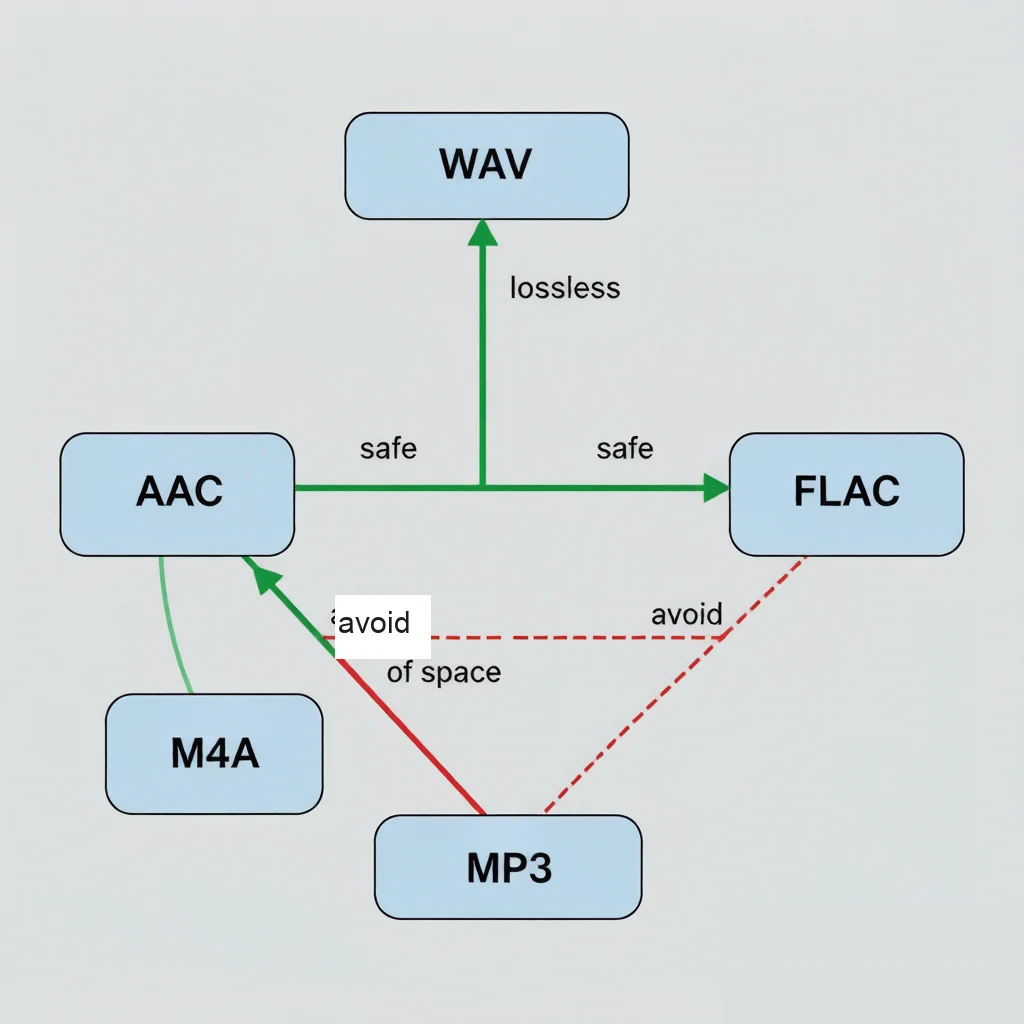
Green arrows = lossless or safe. Red dashed arrows = lossy-to-lossy (quality loss). Red arrow from MP3 → WAV = bigger file, same quality, pure waste of space.
Converting between formats? Our Audio Converter handles MP3, WAV, AAC, FLAC, M4A, OGG — plus extracts audio from video (MP4, MOV, MKV, WEBM). Browser-based, free, no signup.
Which Format for Which Task (Cheat Sheet)
| Task | Use This | Why |
|---|---|---|
| Android ringtone | MP3 | Universal support, small file |
| iPhone ringtone | M4A → rename to .m4r | AAC inside M4A; Apple's native path |
| Podcast editing | WAV | Multi-round editing without generation loss |
| Podcast publishing | MP3 128 kbps (stereo) or 64 kbps (mono) | Voice doesn't need more; smaller = faster downloads |
| Music library (phone) | MP3 320 or AAC 256 | 4× more songs than WAV, indistinguishable quality |
| Music library (archiving) | FLAC | Lossless, metadata support, half the space of WAV |
| Sending to anyone | MP3 320 | Guaranteed compatibility |
| CD backup | FLAC | Bit-perfect, reasonable size |
| Voice memo (daily) | MP3 128 kbps mono | Tiny files, good enough for speech |
| Pro audio production | WAV | Industry standard, no decode step |
FAQ
Is MP3 or WAV better for editing?
WAV. Every re-encode of MP3 degrades the audio further. WAV can be opened, edited, and re-saved indefinitely without any quality loss. Pro workflow: edit in WAV → export final as MP3 once.
Does converting MP3 to WAV improve quality?
No. The audio data MP3 removed during compression is gone forever. Saving as WAV creates a larger file that sounds exactly the same. This is the most common format misconception — the visual equivalent would be photocopying a photocopy onto photo paper and expecting the original image back.
What format does iPhone use for ringtones?
M4R — which is AAC audio in an MPEG-4 container. An M4R file is identical to an M4A file with the extension renamed. To create one: trim your audio to ≤30 seconds, export as M4A (AAC), rename .m4a to .m4r, sync via Finder. No extra software needed.
Is AAC better than MP3?
At the same bitrate, yes. AAC at 128 kbps matches MP3 at ~192 kbps. At 256 kbps, both are transparent for nearly everyone. AAC also degrades more gracefully at very low bitrates — AAC at 96 kbps is still usable for music, while MP3 at 96 kbps is rough. The only MP3 advantage: it plays on pre-2015 car stereos and ancient hardware that never got AAC support.
Can I convert between formats without losing quality?
Depends entirely on direction. WAV ↔ FLAC ↔ ALAC: zero loss, any direction. Lossless → lossy (WAV → MP3): always loses some data, though at 320 kbps you won't hear it. Lossy → lossless (MP3 → WAV): bigger file, same quality, pointless. Lossy → lossy (MP3 → AAC, AAC → MP3): worst case — quality drops from stacked compression. If you need a different lossy format, always encode from a lossless original.
Bottom Line
You don't need to overthink this. The format wars are largely settled by the fact that modern lossy codecs at high bitrates are transparent to human ears — backed by 15+ years of peer-reviewed listening tests.
- Default to MP3 320 kbps. It works everywhere, sounds excellent, and is small enough to be practical.
- Use WAV when you're editing or archiving. That's it. Not for your phone. Not for sharing.
- Use AAC if you're on Apple devices. Your phone already defaults to it. It's slightly more efficient than MP3.
- FLAC is for music archivists and people who own DACs. If neither describes you, skip it.
- Never transcode lossy → lossy. That's the one mistake that actually makes your audio sound worse.
For the tools to actually do any of this — cutting, converting, ringtone making — they're all free and browser-based at audiocut.io. No account, no install, files ≤20 MB never leave your device.